IQOS ILUMA User Manual: What New Users Need to Know
New to ILUMA? This IQOS ILUMA user manual covers setup, charging, the right sticks, controls, smart features, care, troubleshooting, and safety in plain English.
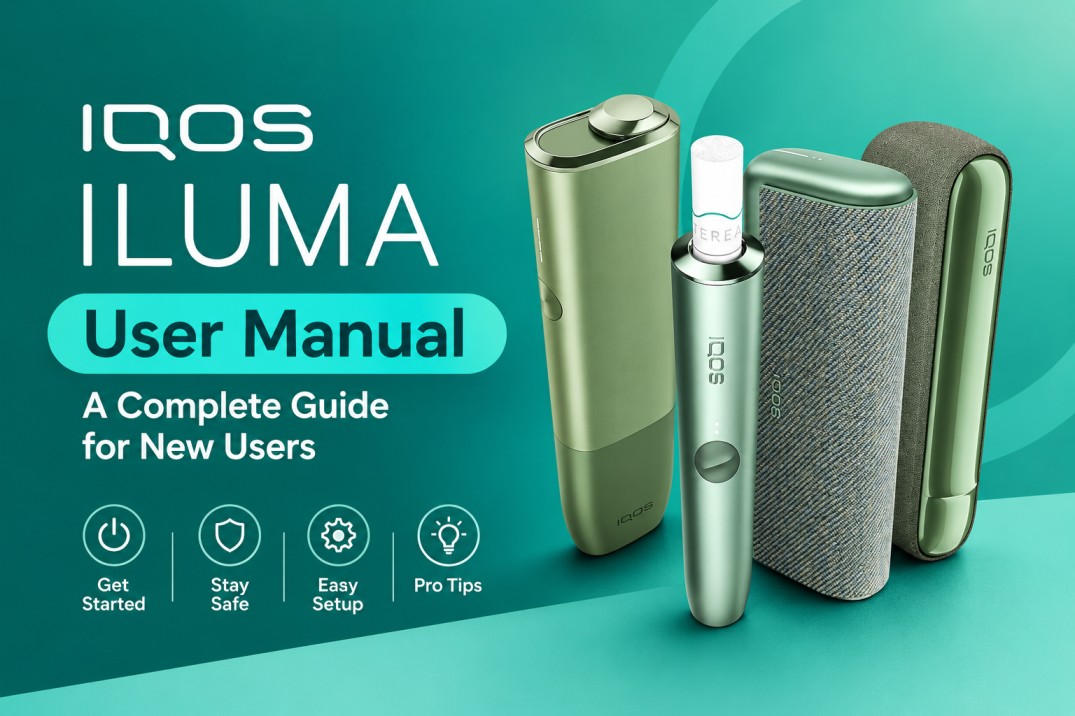
The IQOS ILUMA i range has three models: the all-in-one ILUMA i One, the ILUMA i Standard with a holder and pocket charger, and the premium ILUMA i Prime. All three heat TEREA sticks the same way, so this guide separates shared steps from model-specific ones.
It also flags the two mistakes that damage most new devices: using the wrong sticks and cleaning ILUMA like an old IQOS. For the bigger picture, read about your first 7 days with ILUMA. Small details vary by market, so keep the official guide for your model handy.
Meet the IQOS ILUMA i Range
IQOS ILUMA i One
One pocket-sized unit with a sliding cap, a button, and four status lights. It charges as one piece and runs up to 20 sessions back to back.
IQOS ILUMA i Standard
A holder plus a pocket charger that refills it. The holder adds a touch screen, Pause Mode, and FlexBattery.
IQOS ILUMA i Prime
The Standard’s features in an anodized aluminum body with a textured wrap.
ILUMA i One vs. Standard vs. Prime
| Feature | ILUMA i One | ILUMA i Standard | ILUMA i Prime |
|---|---|---|---|
| Form factor | All-in-one | Holder + pocket charger | Premium holder + pocket charger |
| Full charge time | About 90 min | About 135 min | About 135 min |
| Sessions per full charge | Up to 20 | Up to 20 | Up to 20 |
| Back-to-back sessions | Up to 20 | Up to 3 | Up to 3 |
| Controls | Button + status lights | Touch screen + button | Touch screen + button |
| Pause Mode | No | Yes | Yes |
| FlexPuff | Yes | Yes | Yes |
| FlexBattery (Eco mode) | No | Yes | Yes |
Still deciding? These hidden buying factors help you pick the right one.
IQOS ILUMA i Colors and Editions
Color changes the look only.
ILUMA i One Colors
Midnight Black, Breeze Blue, Digital Violet, Electric Purple, Lime Green, Vivid Terracotta, and the REMIX Limited Edition.
ILUMA i Standard Colors
Midnight Black, Blue, Digital Violet, Electric Purple, Vivid Terracotta, Leaf Green, Galaxy Blue, and the REMIX Limited Edition.
ILUMA i Prime Colors
Midnight Black, Breeze Blue, Electric Purple, Aspen Green, Garnet Red, and the PRIME REMIX Limited Edition.
Availability note: Colors vary by country and retailer, and limited editions sell out.
What’s Included With IQOS ILUMA?
- ILUMA i One: the all-in-one device, a USB-C cable, and the user guide.
- ILUMA i Standard and Prime: the holder, the pocket charger, a USB-C cable, and the user guide.
The AC adaptor is sold separately.
Before you use it: check for damage, confirm every part is there, and read the safety leaflet.
IQOS ILUMA Setup Guide: Getting Started
Charge the Device Before First Use
Charge it fully first. Each solid white light equals 25%.
Turn On and Check the Device
Hold the button (on the pocket charger for Standard and Prime) for 4 seconds until the lights fade on. No response? Charge it longer.
Connect the Device Where Supported
All three models pair with the IQOS app over Bluetooth. Follow our guide to connect ILUMA i to the IQOS app.
Perform a First-Use Check
- Device fully charged
- TEREA sticks ready
- No visible damage
- Nothing inside the heating chamber
- Exact model confirmed
IQOS ILUMA Consumables: What You Can and Cannot Use
What Consumables Are Designed for ILUMA?
ILUMA works only with SMARTCORE sticks. In the UAE, that’s TEREA. Browse all TEREA flavors to find yours.
Can You Use HEETS With IQOS ILUMA?
No. HEETS were made for blade-heated IQOS devices. ILUMA has no blade, so never force one in.
Why Consumable Compatibility Matters
Induction heats the metal element inside TEREA. Sticks without it won’t heat and can jam the holder. TEREA can also damage older devices, as explained in TEREA in older IQOS models.
Never Modify or Disassemble TEREA Sticks
Each TEREA holds a sharp metal part that IQOS warns can cause serious injury if swallowed. Never cut, open, or swallow a stick, keep packs away from children and pets, and bin used sticks properly.
How to Use IQOS ILUMA: Step-by-Step Instructions
Before Starting
Check the battery and pick a straight, undamaged TEREA.
How to Use ILUMA i One
- Slide the cap open.
- Insert a TEREA up to the filter line. It vibrates and starts heating, or press the button for 1 second.
- Start puffing after the 2nd vibration.
- A vibration and flashing light mean 2 puffs or 30 seconds left.
- Remove the stick and close the cap.
The steps are the same on every color, Lime Green included.
How to Use ILUMA i Standard
- Take the holder out of the pocket charger.
- Insert a TEREA up to the filter line. Heating starts on its own, or swipe up on the screen.
- Start puffing after the 2nd vibration. The light guide shows remaining time.
- Remove the stick and dock the holder.
Two dashes on the screen mean up to 3 sessions left. One dash means up to 2.
How to Use ILUMA i Prime
Exactly like the Standard.
How to Use FlexPuff
FlexPuff reads your puffing pattern and can add up to 4 puffs within the 6-minute session. It’s on by default, but it won’t trigger every time or after a pause. See our FlexPuff guide.
How Pause Mode Works
Standard and Prime only. Within the first 3 minutes or 8 puffs, swipe down across the whole screen to pause. Swipe up to resume. After 8 minutes paused, the holder switches off. More in our Pause Mode guide.
Ending a Session
Pull the stick out straight and bin it. TEREA is single use, so never reinsert one.
Understanding IQOS ILUMA Lights, Indicators, and Controls
| Indicator/control | Meaning | What to do |
|---|---|---|
| 1 to 4 solid white lights | Battery level, 25% each | Charge if low |
| Pulsing lights while plugged in | Charging | Leave it plugged in |
| Blinking yellow while charging | Battery below 7% | Keep charging |
| Vibration + pulsing lights after insertion | Heating started | Wait for the 2nd vibration |
| Vibration + flashing light during use | Last 2 puffs or 30 seconds | Finish up |
| Red blinking light | Device error | Reset the device |
| White lights blinking twice | Outside 0°C to 40°C | Move it to room temperature |
Touch and gesture controls (Standard and Prime only): swipe up to start or resume, swipe down to pause. ILUMA i One uses its button and lights only.
Our ILUMA light guide covers each pattern.
IQOS ILUMA Charging Instructions
How to Charge ILUMA i One
Plug the USB-C cable into the device and a compatible AC adaptor. Four solid white lights mean it’s full.
How to Charge ILUMA i Standard
Put the holder in the pocket charger and plug the cable into the charger. Docking recharges the holder, whether it’s the Terracotta or the Leaf Green.
How to Charge ILUMA i Prime
Same as the Standard.
How Long Does IQOS ILUMA Take to Charge?
IQOS lists about 90 minutes for i One and about 135 minutes for the Standard and Prime pocket charger. A flat device blinks yellow until it passes 7%.
IQOS ILUMA Charging Best Practices
- Use a compatible adaptor and the supplied cable.
- Replace damaged cables, and never charge a cracked device.
- Charge somewhere cool and dry.
- On Standard and Prime, Eco Mode helps the holder battery last longer.
IQOS ILUMA Features: What New Users Should Know
Smartcore Induction System
A coil creates a magnetic field that warms the metal element inside TEREA, heating the tobacco from within. No blade means no residue to scrape and no HEETS.
FlexPuff
Up to 4 extra puffs per session on all three models. You can switch it off in the app.
Pause Mode
One pause of up to 8 minutes per session, on Standard and Prime only.
Touch and Gesture Controls
Swipe up or down on the Standard and Prime screen. The i One uses its button.
Smart Indicators
The lights and screen show battery, charging, session time, warnings, and extra puffs.
FlexBattery
On Standard and Prime, Performance Mode gives up to 3 sessions in a row. Eco Mode gives 1, but IQOS says it can extend holder battery life by up to a year.
App and Bluetooth Features
The IQOS app manages FlexPuff, FlexBattery, and screen brightness. Features vary by market.
Does IQOS ILUMA Need Cleaning?
Why ILUMA Requires Less Cleaning
TEREA is sealed and induction heats it from within, so PMI says ILUMA needs no cleaning.
No Blade Scraping
There’s no blade inside, and the induction parts aren’t for you to touch.
What Users Can Clean
Wipe the outside with a soft, dry cloth, and keep the port and cap free of dust and sand. See how to keep ILUMA i looking new. Prime owners, like those with a Garnet Red, should read up on caring for the Prime wrap and metal.
What You Must Never Put Inside the Heating Chamber
Never insert brushes, blades, cotton swabs, sharp objects, liquids, oils, or anything else into the heating chamber. Don’t scrape it, don’t use solvents, and don’t take the device apart.
What If Something Gets Stuck?
Don’t force it or dig with tools. Follow our guide to remove a broken TEREA stick, or contact support.
IQOS ILUMA Maintenance and Everyday Care
- Keep it dry. Never submerge it.
- Protect it from heat. ILUMA works between 0°C and 40°C, so never leave it in a parked car.
- Protect it from damage. Don’t drop or crush it, especially a Galaxy Blue limited edition.
- Check it regularly. Stop using it if you spot cracks or unusual heat.
Common IQOS ILUMA Problems and Troubleshooting
IQOS ILUMA Won’t Turn On
Charge it, then hold the button for 4 seconds. Still dead? Reset it: 7 seconds on the i One button, or 10 seconds on the pocket charger button with the holder inside. Our ILUMA i reset guide explains more.
IQOS ILUMA Isn’t Charging
Swap the cable and adaptor, clear the port, and try another socket.
The Device Doesn’t Recognize the Consumable
Use a TEREA pushed in to the filter line. If heating doesn’t start, press the button (i One) or swipe up (Standard and Prime). Never force it.
The Device Stops During a Session
Check the battery, the lights, and whether you paused it. For weak aerosol, see ILUMA not producing smoke.
IQOS ILUMA Lights Are Flashing
Match the exact pattern to the table above. Red means reset. A white double-blink means temperature.
IQOS ILUMA Gets Unusually Hot
Stop using it, move it away from anything flammable, and contact support.
A Consumable Is Stuck
Never force it. Follow the stuck-stick steps above.
IQOS ILUMA vs. Older IQOS Devices
| IQOS ILUMA / ILUMA i | Older IQOS (e.g. IQOS 3 DUO) | |
|---|---|---|
| Heating | Smartcore induction, no blade | Heating blade |
| Sticks | TEREA (SMARTCORE sticks) | HEETS |
| Cleaning | No cleaning needed | Regular blade cleaning |
| Smart features | FlexPuff, Pause Mode, touch screen, app | Basic lights |
Critical warning: Don’t use HEETS in ILUMA, and don’t use TEREA in older devices. Old cleaning tools never go inside an ILUMA.
10 Things New IQOS ILUMA Users Should Never Do
- Use HEETS in an ILUMA device.
- Force any stick into the chamber.
- Put a blade or cleaning tool in the chamber.
- Pour liquid, oil, or cleaner into it.
- Take a TEREA stick apart.
- Swallow TEREA or any part of it.
- Try to repair the induction parts yourself.
- Keep using a damaged or overheating device.
- Modify the device or the sticks.
- Ignore the safety leaflet for your exact model.
IQOS ILUMA Safety Guide
Nicotine and Adult Use
IQOS states its products aren’t risk-free and deliver nicotine, which is addictive. In the UAE, you must be 18 or older to buy them.
TEREA Safety
Never open or swallow a stick, and keep packs away from children.
Device Safety
Don’t use a damaged device, keep it dry and out of extreme heat, and never open it.
Battery and Charging Safety
Use compatible charging gear, and replace anything damaged.
Disposal
Bin used sticks and recycle old devices as e-waste, even a retired REMIX Limited Edition.
IQOS ILUMA User Manual Quick-Start Checklist
- Before first use: confirm your model, read the safety leaflet, charge fully, and get TEREA sticks.
- During use: insert to the filter line, wait for the 2nd vibration, and watch the lights or screen.
- After use: bin the stick and store the device somewhere cool and dry.
- Never: use HEETS, force sticks, scrape the chamber, insert tools, pour liquids, open TEREA, or modify the device.
Frequently Asked Questions About IQOS ILUMA
Is IQOS ILUMA easy to use for beginners?
Yes. Insert a TEREA, wait for two vibrations, and puff. No lighter, ash, or cleaning.
How do I use IQOS ILUMA for the first time?
Charge it, hold the button for 4 seconds, insert a TEREA, and puff after the 2nd vibration.
How do I charge IQOS ILUMA?
Plug the USB-C cable into the i One, or into the pocket charger on Standard and Prime.
How long does IQOS ILUMA take to charge?
About 90 minutes for i One and 135 minutes for Standard and Prime.
Can I use HEETS with IQOS ILUMA?
No. HEETS need a heating blade, and ILUMA has none.
Can I use TEREA with older IQOS devices?
No. IQOS warns that TEREA can damage older devices.
Does IQOS ILUMA need cleaning?
No. TEREA is sealed and there’s no blade.
How do I clean IQOS ILUMA?
Wipe the outside with a dry cloth. Nothing goes inside.
What is the Smartcore Induction System?
A magnetic field heats the metal element inside TEREA, so the tobacco heats from within.
What is FlexPuff on IQOS ILUMA i?
A feature that can add up to 4 puffs per session, depending on how you puff.
What is Pause Mode?
A Standard and Prime feature that pauses a session for up to 8 minutes.
Why is my IQOS ILUMA not turning on?
Usually a flat battery. Charge it, then reset if needed.
Why is my IQOS ILUMA not charging?
Try a known-good cable and adaptor, and clear the port.
What do the IQOS ILUMA lights mean?
White shows battery and session time, yellow means very low charge, and red means an error.
Why can’t I put HEETS in IQOS ILUMA?
Induction needs the metal element that only SMARTCORE sticks have.
What is the metal part inside TEREA?
The heating element. It’s sharp, so never open or swallow a stick.
Can I put a cleaning brush inside IQOS ILUMA?
No. There’s nothing to clean, and a brush can damage the chamber.
Which IQOS ILUMA i model should I choose?
Pick i One for simplicity, Standard for the screen and Pause Mode, or Prime for a premium body like Aspen Green.
Where can I find the official IQOS ILUMA manual?
On your country’s official IQOS website, under Support, for your exact model.
Final Takeaway: Using IQOS ILUMA Correctly
Here’s the short version of this IQOS ILUMA user manual:
- Know your exact model, and use only TEREA.
- Charge it the way your model needs.
- Learn your lights, FlexPuff, and Pause Mode.
- Never put tools, liquids, or objects in the chamber, and never open a stick.
- Contact official support when a fix isn’t safe.
Where to Buy IQOS ILUMA i in the UAE
You can order every model and color in this guide, from the Vivid Terracotta i One to the Prime range, plus the full TEREA lineup, from TEREA Dubai. Bookmark this guide for the next time a light catches you off guard.
This product is not risk-free and delivers nicotine, which is addictive. For adults 18+ only.