Condensation, a bit of e-liquid residue, dust, or a pod that isn’t sitting quite right—any of these can break the connection between your pod and device. When that happens, you’ll notice the device not activating every draw, not recognizing the pod, or the vapor turning patchy for no obvious reason.
This guide walks through inspecting and cleaning the accessible connection points safely, without opening the device or touching anything you shouldn’t. One thing to be upfront about: cleaning fixes residue-related problems. It won’t repair damaged electronics, broken pins, or a faulty RELX pod; we’ll cover how to tell the difference below.
What Are RELX Pod Connection Points?
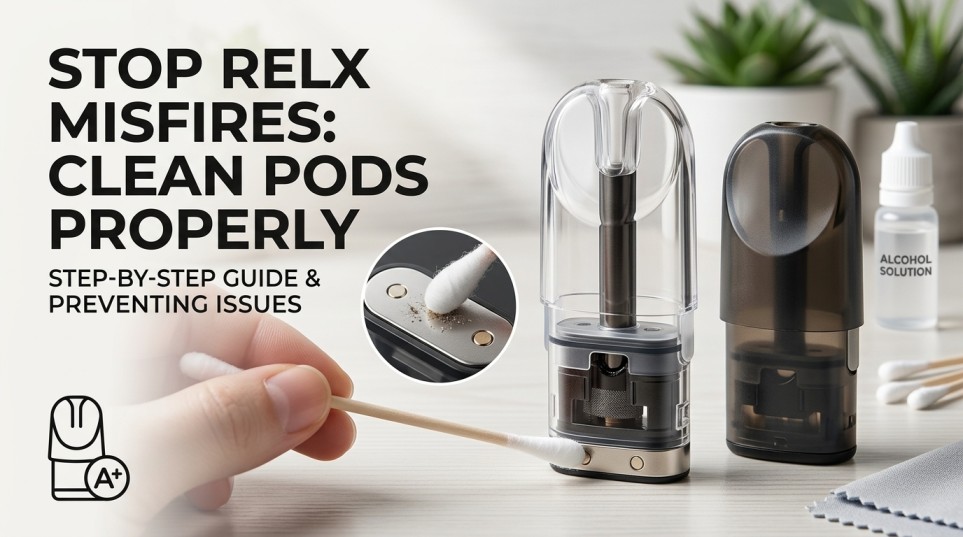
The connection point is the small electrical contact area where your pod meets the device: one or two spring-loaded metal pins pressing against flat metal contacts on the base of the pod. That contact completes the circuit and lets the device recognize the pod and fire the coil.
Because it’s an open electrical contact, anything sitting on that surface—condensation, a trace of e-liquid, a bit of dust—can interrupt it. It doesn’t take much; a thin film of residue is often enough to cause intermittent activation.
Only clean the externally accessible part of this area. Don’t try to open or disassemble the device. RELX devices are closed systems, and going further risks damaging the unit and voiding any warranty.
Common causes of dirty contacts: condensation from normal use, small traces of e-liquid residue, dust and lint from a pocket or bag, leakage from a damaged pod, and dried residue that stiffens up and interferes with a pin’s movement.
Signs of a Dirty or Poor RELX Pod Connection
- The pod isn’t consistently detected.
- The device activates on some draws but not others.
- A draw occasionally produces no vapor at all.
- The same pod works fine one moment, then acts up after removal and reinsertion.
- Visible condensation or a slightly sticky film around the connection area.
- One contact pin sits lower than the other or doesn’t spring back properly.
Important: none of these symptoms automatically mean your contacts are dirty. A faulty pod, a damaged pin, a battery issue, or an internal fault can look the same from the outside. Cleaning is the right first step, but not the only possible fix.
What You Need to Clean RELX Pod Contacts
Materials: a clean, lint-free microfiber cloth, cotton swabs, good lighting, and optionally high-purity isopropyl alcohol, used sparingly.
Using IPA safely: never spray it directly onto the device. Apply a small amount to a swab instead, keep liquid away from openings and internal parts, and let the area dry fully before reinstalling the pod. Follow your device’s own instructions if they call for something different. RELX’s guidance for several models recommends just a dry or lightly moistened cotton bud, so when in doubt, less is more.
Avoid water or soaking, household cleaners, spraying liquid directly onto the device, sharp objects, abrasive materials, excess pressure on the pins, or heat and hair dryers to speed drying.
How to Clean RELX Pod Connection Points Step by Step
1. Remove the pod. Take it out first, and set it somewhere clean and dry.
2. Inspect the pod contacts. Look for condensation, residue, dust, or damage. Replace a damaged or leaking pod rather than repeatedly cleaning it.
3. Inspect the device contact pins. Check whether both accessible pins sit at roughly the same height, then gently press each to confirm it moves and springs back. Don’t force a pin that feels stuck; if it stays depressed, stop and look at service or replacement.
4. Remove loose residue. Use a dry swab or cloth to lift off loose moisture, wiping outward so you’re not pushing residue further in.
5. Clean sticky residue carefully. If appropriate for your model, lightly dampen a swab with IPA and gently wipe the accessible contacts. Never pour or spray into the pod chamber, and follow up with a fresh, dry swab.
6. Let it dry. Give it time to dry fully, skip the hair dryer, and don’t reinstall the pod while moisture remains.
7. Reinstall the pod. Confirm it’s compatible, then seat it without forcing it.
8. Test the connection. If the problem’s still there, move to troubleshooting below rather than cleaning the same contacts again; repeated cleaning won’t fix something that isn’t residue-related.
Cleaning Tips Across RELX Models
The core process—inspect, clean gently, dry fully, and reinstall—stays largely the same across compatible RELX pod devices, so there’s no need for a different routine per model. That said, always prioritize your model’s official instructions if they conflict with general advice like this.
If you’re comparing devices while you’re at it, the RELX Infinity 2 is popular for its adjustable output, the RELX Infinity Plus sticks to simpler, fixed-output operation, and the RELX Artisan is worth a look if you’re shopping rather than troubleshooting. Our full RELX device range is a good place to compare all three.
How to Prevent RELX Pod Connection Problems
- Check pods before installation for leakage, cracks, or excess moisture, and skip anything already compromised.
- Keep the pod area dry by wiping away condensation before it builds up, and avoid storing the device where moisture or debris can get in. In a humid climate, this matters more than you’d think; our piece on why RELX pods leak in Dubai’s humidity and how to fix it covers exactly this.
- Handle pods carefully. Insert and remove them without force, and don’t keep reseating one that’s already secure.
- Replace leaking pods rather than cleaning around them, since a leaking pod keeps recontaminating the connection every time it’s used.
RELX Pod vs RELX Pod Pro: What to Do If Cleaning Does Not Work
Sometimes what looks like a connection problem is really a pod-specific fault. Before assuming your device is at fault, test with another compatible, fresh pod; if that one works fine, you’ve found your answer.
Compatibility matters more than nicotine strength or flavor when replacing a pod. Depending on what your device supports, that might mean a standard RELX Pod, the RELX Pod Pro 18mg, or the RELX Pod Pro 2 range. Nicotine strength has no bearing on whether cleaning solves a connection issue; that’s purely a compatibility and condition question.
Troubleshooting RELX Misfires After Cleaning
| What You Notice | What to Check |
|---|---|
| Pod not detected | Pod seating and contact cleanliness |
| Device activates inconsistently | Condensation, residue, or pod fit |
| No vapor | Pod condition, compatibility, and charge |
| Problem occurs with one pod | Try another compatible pod |
| Problem occurs with every pod | Inspect device contacts, consider service/replacement |
| Visible leakage | Stop using the affected pod and replace it |
If only one pod causes the problem, try a different compatible pod; if that one works normally, the original is likely defective rather than your device. If every pod causes the problem, recheck the accessible contacts for a stuck or abnormal pin; at that point device-level troubleshooting or manufacturer support makes more sense than repeating the cleaning. If a contact pin is stuck, don’t pry, bend, or dismantle the device, if a gentle check confirms it isn’t returning to position normally, stop using it until it’s properly assessed. And if the device still misfires after all that, stop repeating the cleaning: check charging status and pod compatibility first, and if misfires continue, replacing the pod or contacting support is the next step.
Common Mistakes When Cleaning RELX Pod Contacts
Using too much cleaning liquid or spraying it directly onto the device, scraping at contacts with anything sharp, forcing the spring-loaded pins, reinstalling a pod while the contacts are still wet, continuing to use a pod that’s visibly leaking, assuming every misfire must be dirty contacts, and disassembling the device to reach internal parts.
When Cleaning Is Not Enough
Stop DIY troubleshooting and get proper support if you notice damaged contact pins, a pin that stays stuck down, visible liquid intrusion, physical damage, the same fault across multiple compatible pods, unusual heat, or persistent misfires that cleaning hasn’t resolved. At that point, manufacturer or seller support is the right call rather than attempting further repairs yourself.
RELX Pod Connection Cleaning FAQ
Why is my RELX device not detecting my pod?
Usually, residue or condensation on the contacts, a poorly seated pod, or a faulty pod can prevent detection. Clean the contacts and reseat the pod first. If the issue continues, try another compatible pod.
Can condensation cause RELX pod misfires?
Yes. Condensation can interfere with the electrical connection and cause inconsistent activation or missed draws. Wipe the contacts with a dry cloth or cotton swab and allow them to dry completely.
Can I clean RELX pod contacts with isopropyl alcohol?
Yes, if your device instructions allow it. Apply a small amount to a cotton swab rather than spraying alcohol directly onto the device. Let the contacts dry fully before reinstalling the pod.
How do I clean the spring-loaded contacts on a RELX device?
Remove the pod and wipe the contact pins with a dry cotton swab. If residue remains, lightly dampen the swab with isopropyl alcohol, wipe gently, and use a fresh dry swab afterward. Make sure the contacts are completely dry before reinstalling the pod.
What should I do if a RELX contact pin is stuck?
Do not pry, force, or attempt to repair the pin yourself. A stuck contact may indicate a mechanical issue that requires assessment by the manufacturer or seller.
Why does my RELX device work with one pod but not another?
If the device works normally with one compatible pod but not another, the problem is likely with the pod. Test another compatible pod and replace the faulty one if the issue follows the original pod.
Should I replace a leaking RELX pod?
Yes. A leaking pod can repeatedly contaminate the device contacts, so cleaning may only provide a temporary solution. Replace the leaking pod and clean any accessible residue before using a new one.
When should I stop troubleshooting a RELX device?
Stop troubleshooting if you notice damaged contacts, a stuck pin, liquid inside the device, physical damage, unusual heat, or persistent misfires after cleaning. Contact the manufacturer or seller for further assistance rather than attempting an internal repair.
Final Takeaway
Keeping a RELX device running reliably comes down to a simple routine: inspect, clean gently, dry fully, and never force the contacts. Done regularly, this clears up most residue-related misfires. What it won’t do is repair damaged hardware; if you’ve cleaned carefully and the problem persists, testing with a fresh, compatible pod is the next step before assuming the device itself is at fault.
If a pod turns out to be the culprit, browsing the current RELX Pod and RELX device ranges is a good next stop. If you’d rather have pods delivered than head out to a store, our complete guide to ordering RELX pods online with same-day delivery walks through how that works.
About This Guide
This guide covers only external, accessibly reachable maintenance; it doesn’t cover or recommend opening any RELX device. Steps are cross-checked against RELX’s own published device care guidance, which recommends a dry or lightly moistened cotton bud for cleaning contact points. Always defer to your model’s official instructions where they differ. Cleaning can resolve residue-related issues, but it isn’t a guaranteed permanent fix; hardware faults need manufacturer or seller support.
Responsible Use Notice: RELX products contain nicotine, an addictive substance, for adult smokers and existing nicotine users only. Not for minors, non-smokers, or pregnant or breastfeeding women. Sale is restricted to buyers of legal age under UAE regulations.
Where to Buy Genuine RELX Pods and Devices in the UAE
If cleaning and troubleshooting point to a pod or device that needs replacing, buying from an authorized seller matters; it’s the gap between a genuine product with real support and a grey-market unit with none. Terea Zone stocks the full RELX device range in the UAE, including Infinity 2, Infinity Plus, and Artisan, alongside compatible pods like RELX Pod Pro 18mg and RELX Pod Pro 2.
A quick checklist before you order: match the pod to your exact device model, since compatibility affects performance and connection reliability; check that the seller verifies age at checkout; look for UAE-based stock and delivery so a replacement isn’t held up in shipping; and if ordering online, same-day delivery can save a wasted trip if your current pod is the problem.